Pre-Registration Action Items
Beginning in Spring 2026, MUW is requiring all students to complete Action Items in Banner Self-Service before registering for courses. The Action Items Include:
- Review and update Contact Information
- A Financial Responsibility Acknowledgement
- A Student Enrollment Agreement
Upon clicking Register for Classes, the 3 items will be presented on screen and must be completed before proceeding to the Select Term screen.
Registration Action Items
- Log into WConnect
- Click on Banner Self Service
- Click on Students at the top
- Click on Register for Classes
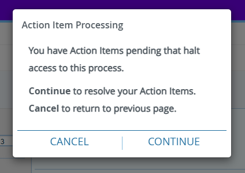
- Figure 1 Action Item Processing will appear on the screen
- Click Continue to proceed to the Action Items
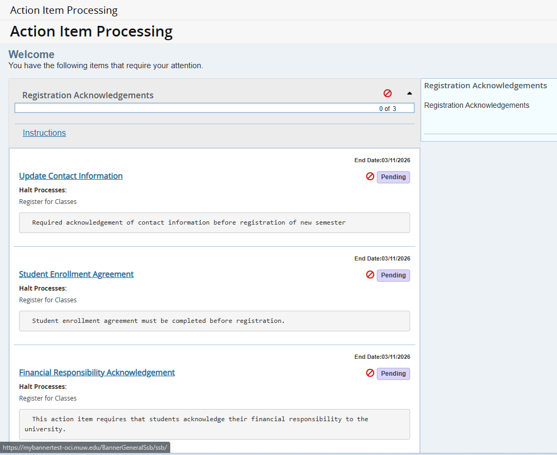
- All 3 Items are Pending in the Purple Box
- The list of Action Items appears as in Figure 2
- Click on Update Contact Information
- The right side of screen loads the Update information.
- Read the information and click the links to verify and update if needed your information.
- Check the box for “I have verified my contact information.”
- Click Save
- Read the Financial Responsibility Acknowledgement
- Click on Financial Responsibility Acknowledgement
- The right side of screen loads the information.
- Read the information carefully and click the links to review the information
- Check the box for “I hereby acknowledge and agree with MUW’s Financial Agreement.”
- Click Save
- Read the Student Enrollment Agreement
- Click on Student Enrollment Agreement
- The right side of screen loads agreement
- Read the information carefully and click the links to review the information
- Check the box for “I agree to this Mississippi University for Women Student Enrollment Agreement”
- Click Save
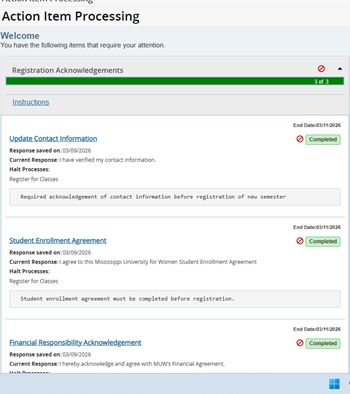
- All items will need to be Completed before Clicking Continue to the Registration screens.
- In the upper right hand corner, Click Continue to the Select Term to begin registration.