How to Apply
Apply for Admission – Application and Form Process
For Students at a Local Partnership School:
- If you attend a high school that has a partnership with The W, start by speaking with your school counselor or dual enrollment advisor. They will guide you through the application process.
For Independent or Homeschool Students:
- If you are a homeschool student or attend a non-partner school, and need help with the application process, please contact the Dual Enrollment Office at dual@muw.edu or 662-329-7140.
Step One: Navigate to the MUW Dual Enrollment Application
Dual Enrollment Application
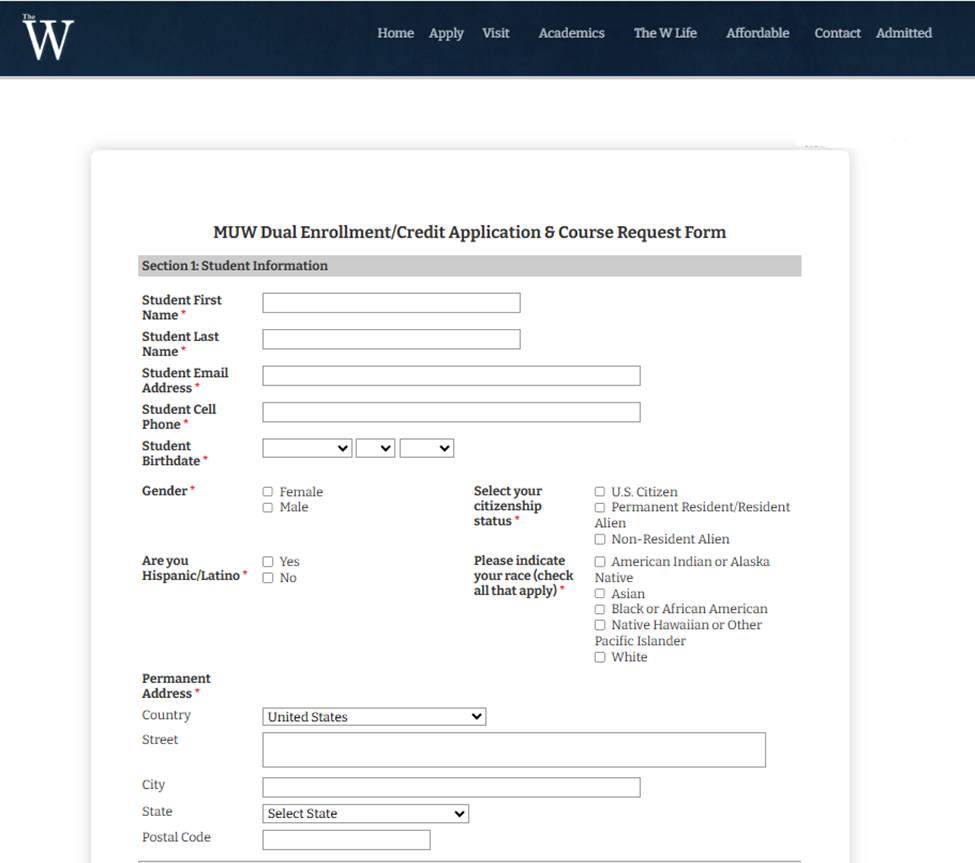
Step Two: Complete all required questions plus any optional information you would like to provide.
Required questions will be marked with a red asterisk(*)
- Section 1: Student Information: In the first section of the form, you will provide required information about yourself (the student). The W must have this information on file for you to enroll you in any course taught by The W.
- Section 2: School and Academic Information: You will provide information about the school you currently attend, your GPA, and you may provide information about any standardized test scores you have completed. Depending on what school you attend, you may also be asked to provide the name and email address for your school/guidance counselor/clerk who can submit school materials on your behalf (such as a high school transcript). If you have questions about immunizations or exemption records, please email The W Health Center at healthcenter@muw.edu.
- Section 3: Course Registration: You will indicate which dual enrollment courses you would like to take at The W.
- Section 4: Parent Information: You will be required to provide the name and email address for at least one parent. The W will contact this parent to receive their consent for you to enroll in dual enrollment courses at The W. Parent or guardian will confirm their understanding of FERPA ( Family Educational Rights and Privacy Act) regulations. It allows The W to communicate with the parent/guardian about the student’s educational records as permitted by the law.
- Section 5: Certification: You will type your name in place of a legal signature to verify that the information you have provided on the form is truthful and accurate.
Step Three: Once you have completed all required questions in each section of the form, submit the form. If you have not completed one or more of the required questions you will receive an error message and will not be able to submit the form until all required questions have been answered.
Step Four: After submitting the Dual Enrollment Application form, two people will be notified of your submission:
- Your designated school clerk/counselor: The designated school clerk/counselor will need to submit school materials to complete your dual enrollment application including a high school transcript, valid standardized test scores, and proof of required immunizations.
- Your designated parent: Your parent must provide their consent before you can officially enroll in any dual enrollment course at The W. When you provide your parent’s name and email address in Section 4 of the form, you are consenting to allow The W to share your enrollment information with that parent.
Step Five: Get Advised
Local Partnership School students will need to make an appointment to be advised by their high school clerk/counselor. See “Find my High School” tab for high school clerk/counselor contact information.
Homeschool or Independent students will need to make an appointment to be advised to register for classes by the Student Success Center. See contact below:
Kelly Hollowell
Academic Advising & Support for Dual Enrollment
E-Mail: khollowell@muw.edu
Phone: (662) 241-7470
Step Five: WBooks+ and Parking Pass
If you are enrolled in a W dual enrollment course at your high school, check with your instructor and/or counselor about the textbook and any other materials you will need. If you are taking a dual enrollment course on The W campus, contact The W’s Dual Enrollment Office to help you determine if the W Books+ program is right for you. If your high school is a W Dual Enrollment Partner, your high school counselor may also be able to assist you with this information.
Parking on campus requires a valid parking decal, which you can purchase online through your WConnect account. Instructions are provided on the decal for how to place it on your vehicle to avoid tickets. Parking areas are clearly marked, and students must park in areas marked with white lines.